

Clear Browser Cache & Reload Page

Last updated: Jun 13, 2024
26
views

Hello, this article will walk you through refreshing .
Browsers cache all kinds of data to speed up the browsing experience and enable features, but sometimes cached data can cause problems that prevent a page being display correctly. Clearing your cache and reloading a page is a great general troubleshooting step akin to "turning it off and back on again".
The quickest way to to clear your cache for a specific page is to use the browser's developer tools to refresh.
- Press CTRL + SHIFT + I or go your browser options → More tools → Developer tools.
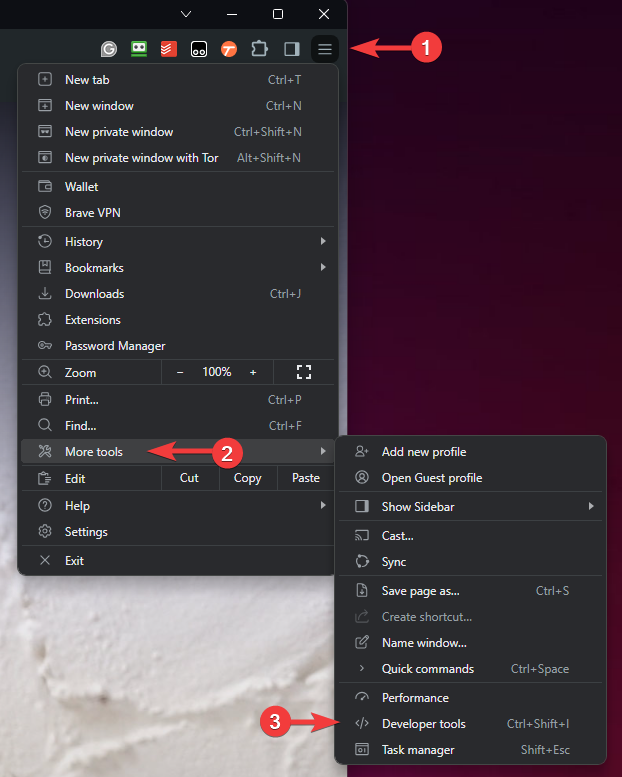
- A large panel will open showing a lot of technical information, but you can ignore it. While the developer tools panel is open, right-click on the refresh button and click Empty Cache and Hard Reload.
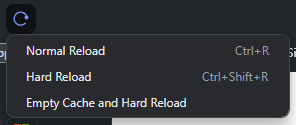
- That's it! Your browser will refresh the page without using any cached data. You can close the developer tools panel by clicking the X in the top right of the panel.

