

PreVeil Drive stuck loading

Last updated: Nov 08, 2024
54
views

PreVeil Drive stuck loading (quick fix)
If the Drive tab in My PreVeil gets stuck loading, please follow these steps to get it working again:
1. In the system tray, expand the hidden icons and locate the PreVeil icon.
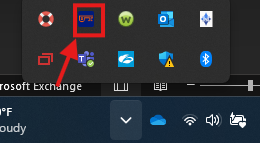
2. Right-click on the icon then hover over Power Options and select Restart PreVeil Services.
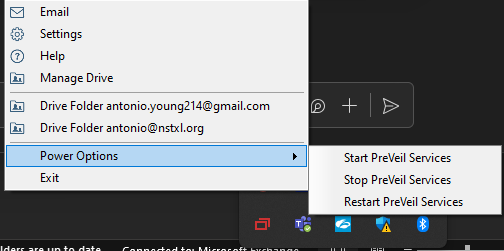
3. Give it a few minutes, then refresh the PreVeil website. You may need to click on the Mail tab, then give it a moment before clicking on the Drive tab again.

