


Keeper Security is a credential (password) manager service capable of securely generating and storage access credentials and other records such as addresses and payment cards. All employees are provided with Keeper and expected to use it to generate and manage secure credentials to the various company systems.
Accessing Keeper
To access Keeper, you can either:
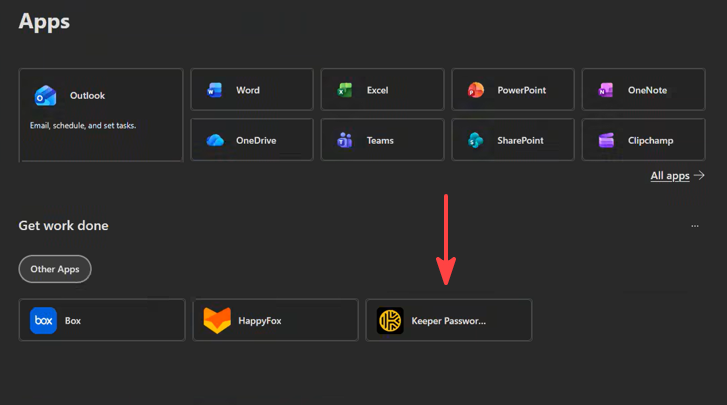
- From the Microsoft 365 Cloud Apps dashboard, click on Keeper found in the Get work done section.
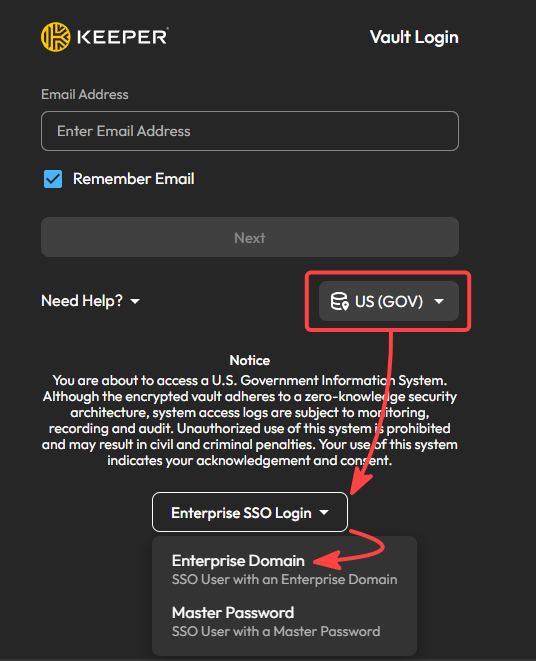
- Navigate to the Keeper Gov Cloud login page, ensure US (GOV) is selected, click on Enterprise SSO Login, and select Enterprise Domain; then log in using your Microsoft username and password.
Family Benefit
Your company Keeper service comes with a family benefit. You can claim a Keeper family account for you up to 4 additional people to use Keeper personally for free. Your personal accounts are completely separate from your company account; company admins have no insight or access into your personal accounts. When you depart the company, your family plan will enter trial status: you will have 30 days to decide whether to continue paying for service.
To claim your family benefit, first sign up for a Keeper personal plan trial, then email [email protected] with your company email address and the email you used to sign up for your trial. Keeper Business Support will activate the family benefit on your personal account.
Keeper Support and Training Resources

